
Understanding Stored Credentials for Cloud Services in Willow360
What Are Stored Credentials?
When a workflow includes an upload action for SharePoint, OneDrive, Google Drive, or Dropbox, Willow360 needs permission to access your account on that service. The first time a file reaches such an action, you are prompted to sign in to the relevant cloud service. Once authenticated, Willow360 stores the connection credentials so that future uploads happen automatically without requiring you to sign in again each time.
Stored credentials are held securely within Willow360 and are personal to each user. They are not shared with other users in your organisation.
How Stored Credentials Work
When a file in a workflow reaches a cloud upload action, Willow360 checks whether credentials for that service are already stored for the user responsible for the upload. If they are, the upload proceeds automatically. If not, that user receives a notification prompting them to sign in to the cloud service. Once they sign in, the credentials are stored and all files currently waiting for that sign-in across any workflow are unblocked immediately.
Credentials remain valid until they expire. If credentials are not used for a period of time, they may expire and Willow360 will prompt the relevant user to sign in again.
Google Drive and Dropbox: Personal and Business Credentials
For Google Drive and Dropbox, Willow360 stores separate credentials for Personal and Business accounts. This means you can be signed in to your personal Google Drive with one set of credentials and a shared Google Drive with another.
When you clear credentials for Google Drive or Dropbox from Personal Settings, both the Personal and Business credentials for that service are removed together.
The Authenticator Credential
If your organisation uses two-step verification with an authenticator app, the connection between your authenticator app and your Willow360 account is also stored in the Stored Credentials panel. You can disconnect the authenticator app from here. Note that doing so removes the connection from Willow360 but does not remove the Willow360 entry from the authenticator app itself, which must be removed from the app manually.
Why You Might Need to Clear Stored Credentials
Security: if you believe your cloud storage account has been compromised or you want to revoke Willow360's access, clearing the stored credentials immediately prevents any further uploads on your behalf.
Account changes: if you change your cloud account password or update your security settings, existing credentials may become invalid. Clearing them and re-authenticating ensures Willow360 has a valid connection.
Troubleshooting: if a cloud upload action is repeatedly failing and credentials are suspected to be the cause, clearing and re-establishing them can resolve the issue.
Switching accounts: if you need Willow360 to use a different account for uploads, for example moving from a personal to a business account, clear the existing credentials and sign in with the new account when prompted.
How to Clear Stored Credentials
Credentials can only be cleared from Personal Settings. There is no other way to remove them.
To clear credentials:
Navigate to Personal Settings by clicking your name in the top right corner of the dashboard. Open the Stored Credentials panel. The panel shows only the credentials that are currently stored. Select the cloud service whose credentials you want to clear and confirm the action.
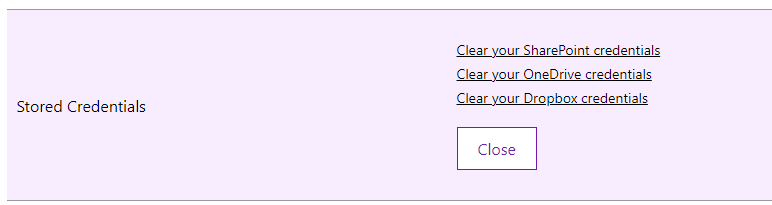
If you clear credentials for all services, the panel will display a message confirming that no credentials are currently stored.
If Willow360 needs your credentials again for a workflow upload action, it will prompt you to sign in at that point and new credentials will be stored automatically.