
Understanding the User Roles Available
1. Administrator
Responsibilities:
- User Management: Administrators have the highest level of access, allowing them to manage user accounts, assign roles, and set permissions.
- System Configuration: They can configure system settings, integrate with other services, and customize the platform to meet organizational needs.
- Workflow Management: Administrators can create, modify, and delete workflows, ensuring they align with business processes.
- Security Oversight: They oversee security settings, including access controls and audit logs, to ensure data integrity and compliance.
Ideal For:
- IT Managers
- System Administrators
- Senior Management
2. Workflow Creator
Responsibilities:
- Workflow Design: Workflow Creators are responsible for designing and setting up workflows. They can choose actions, set triggers, and define the flow of tasks.
- Testing and Optimization: Workflow Creators test workflows to ensure they function correctly and optimize them for better performance.
Ideal For:
- Process Managers
- Project Managers
- Business Analysts
3. User
Responsibilities:
- Task Execution: Users perform tasks assigned to them within workflows, such as filling out forms, uploading documents, or completing specific actions.
- Document Access: They can access and interact with documents as permitted by their role, ensuring they have the information needed to complete their tasks.
- Collaboration: Users collaborate with other team members, providing input and completing tasks as part of the workflow.
Ideal For:
- General Staff
- Team Members
- Project Participants
Setting Permissions
In Willow360, permissions are set for individual workflows rather than globally. This allows for precise control over who can access and interact with each workflow. Here’s how you can manage permissions:
- Who Can Use This Workflow: In the workflow editor, you can specify which users or teams can use the workflow. This option ensures that only authorized personnel can initiate or interact with the workflow.
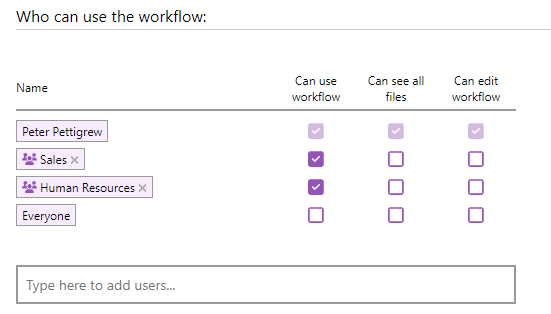
- Can Use Workflow: Grants the ability to use the workflow.
- Can See All Files: Allows users to view all files associated with the workflow.
- Can Edit Workflow: Provides permission to modify the workflow.
To restrict access, you can specify a user or team and omit all three options, effectively denying access to the workflow.
Conclusion
Understanding the roles within Willow360 is crucial for effective platform management and workflow optimization. Each role is designed to ensure that users have the appropriate level of access and responsibility, promoting efficiency, security, and compliance. By assigning the right roles to the right people and managing permissions at the workflow level, organizations can maximize the benefits of Willow360 and streamline their operations.